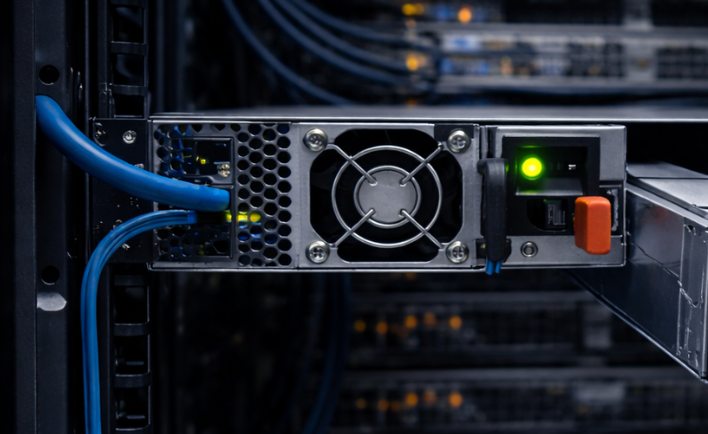
A reliable power supply is essential for every server. It converts incoming electrical power into the voltages required by the server's processors, memory, storage drives, fans, and other components. Choosing the wrong unit can lead to compatibility problems, unexpected shutdowns, insufficient power, or the loss of redundancy in a critical system.
Whether you are upgrading a rack server, replacing a failed power supply, building a homelab, or maintaining enterprise equipment, understanding wattage, efficiency, redundancy, connectors, and model compatibility will help you make a better purchasing decision.
1. What Does a Server Power Supply Do?
A server power supply unit, commonly called a PSU, takes AC power from a wall outlet or power distribution unit and converts it into regulated DC power that the server can use. Enterprise servers often run continuously and may support multiple power supplies for improved availability.
A server PSU provides power to components such as:
- Processors: CPUs and their voltage regulation circuitry.
- Memory: System memory and motherboard components.
- Storage: Hard disk drives, SATA SSDs, SAS drives, and NVMe storage.
- Expansion cards: Network adapters, storage controllers, and supported accelerator cards.
- Cooling: System fans and other internal devices.
The PSU must provide enough capacity for the expected system load while meeting the server manufacturer's electrical and physical requirements.
2. How Much Wattage Does Your Server Need?
Wattage indicates how much electrical power a PSU can deliver. Common server PSU ratings include 450W, 550W, 750W, 800W, 1100W, 1400W, and higher capacities. The appropriate rating depends on the server model and installed hardware.
A server with one processor, a few memory modules, and several drives may require much less power than a fully populated server with multiple processors, many drives, high-speed networking, and accelerator cards.
Factors That Affect Power Requirements
- Processors: CPU model, number of sockets, and processor power limits affect consumption.
- Memory: More memory modules increase power demand.
- Storage: The number and type of installed drives affect the power budget.
- Expansion cards: GPUs, high-speed NICs, and RAID controllers may require additional power.
- Cooling: Fan speed and cooling requirements can increase as system load and temperature rise.
Important: Do not select a PSU based only on average power consumption. Check the manufacturer's configuration guidance and supported PSU ratings for your exact server model.
Should You Buy a Higher-Wattage PSU?
A higher-rated PSU can provide additional headroom, but it is not automatically a suitable replacement. The server must support the PSU's form factor, electrical specifications, connectors, and wattage class. Some systems support multiple PSU capacities, while others have specific restrictions.
3. What Is a Redundant Power Supply?
Redundant power supplies can allow a server to continue operating if one PSU fails, provided the system is configured correctly and the remaining unit can support the current load. This is particularly useful for production servers where unexpected downtime can affect applications, websites, databases, or business operations.
Common Power Supply Configurations
- Single PSU: One power supply powers the server. A failure generally causes an outage until power is restored or the unit is replaced.
- Dual redundant PSU: Two compatible PSUs provide backup capacity according to the server's power-management design.
- Hot-swappable redundant PSU: A supported PSU can be replaced while the server remains running, if the server design and operating conditions permit it.
Two installed PSUs do not automatically guarantee full redundancy. The remaining unit must have enough capacity for the system's load, and the server must support the intended redundancy mode.
1+1 Redundancy Versus Load Sharing
In a typical 1+1 redundant configuration, either PSU is intended to carry the required load if the other fails. In a load-sharing configuration, both units may contribute during normal operation. The exact behavior depends on the server platform and its power-management settings.
For better protection, connect redundant supplies to separate supported power sources or PDUs where possible. Two PSUs connected to the same failed outlet or circuit may not provide the expected protection.
4. Hot-Swap Power Supplies Explained
Hot-swap PSUs are designed for replacement without shutting down the entire server when the platform supports this function and the remaining supply can handle the load. They are common in enterprise rack servers and data-center systems.
Before replacing a hot-swap PSU, verify the server's service instructions and status indicators. Confirm that the other PSU is operating normally and can handle the current load. Follow the manufacturer's procedure rather than assuming every removable power supply is hot-swappable.
Some replacement units look similar but use different connectors, housings, ratings, or control electronics. A PSU that physically slides into a bay is not necessarily compatible with that server.
5. Understanding Power Supply Efficiency
A PSU does not convert all incoming electrical power into usable output power. Some energy is lost as heat during conversion. Efficiency describes how much input power reaches the system as output power.
For example, if a server requires 600W of DC output and the PSU operates at 90% efficiency, it draws approximately 667W from the AC source. The difference is lost mainly as heat. Actual efficiency depends on the PSU and its operating load.
What Does 80 PLUS Mean?
80 PLUS is a power supply efficiency certification program. Depending on the certification level and test conditions, a certified PSU meets specified minimum efficiency requirements. Common labels include Bronze, Silver, Gold, Platinum, and Titanium.
A higher efficiency rating can reduce wasted energy and heat, particularly in systems that operate around the clock. However, the label alone does not guarantee compatibility or reliability for every server.
Why Efficiency Matters in a Server Room
- Lower conversion losses can reduce electricity use.
- Less wasted power can reduce heat generated by the PSU.
- Reduced heat may help lower cooling requirements.
- Efficiency can matter significantly when operating many servers continuously.
When comparing units, consider the actual PSU model, efficiency certification, supported load range, warranty, and manufacturer compatibility requirements.
6. AC Input, Voltage, and Power Connections
Server power supplies must be suitable for the electrical supply available at the installation location. Check the input-voltage range and frequency listed on the PSU label or in the manufacturer's documentation.
Many enterprise PSUs support a wide AC input range, but you should not assume every model does. Some data-center systems use different power arrangements, and specialized equipment may require a different type of supply.
Check These Electrical Details
- Input voltage: Confirm that the PSU supports the available AC supply.
- Input frequency: Check the rated frequency, typically stated in hertz.
- Power cord: Confirm the correct connector type and a suitable, properly rated cable.
- PDU compatibility: Ensure the power distribution unit and circuit can handle the expected load.
- Power capacity: Account for the combined load of equipment sharing the same circuit.
Do not use adapters or power cables simply because their connectors fit. Electrical ratings and grounding must be appropriate for the equipment and installation.
7. Server PSU Compatibility: What to Check Before Buying
Compatibility is one of the most important parts of choosing a replacement server power supply. Two units with the same wattage may not be interchangeable, even if they come from the same manufacturer.
Verify the Exact Server Model
Start with the server manufacturer, product family, generation, and exact model. A PSU intended for one generation of a rack server may not work in another. Check the server's official documentation and supported parts list whenever possible.
Match the Part Number
Look for the original PSU part number, spare part number, option number, or other manufacturer identifier on the existing unit. Compare it with the replacement listing and verify any documented compatible replacements. Do not rely on the product title alone.
Inspect the Following Details
- Manufacturer and exact part number.
- Supported server models and generations.
- Rated output wattage and electrical specifications.
- Physical dimensions and PSU bay design.
- Connector layout and electrical interface.
- Hot-swap and redundancy support.
- Required power cords or accessories.
- Condition, warranty, and seller return policy.
Buying tip: Search by the exact PSU part number whenever possible. If a listing uses a generic title, ask the seller to confirm the part number and supported server models before ordering.
8. New, Refurbished, and Used Server Power Supplies
Server PSUs are sold in different conditions, including new, open-box, refurbished, and used. The right choice depends on your budget, server requirements, availability, and tolerance for downtime.
New Power Supplies
New units may be preferable for critical systems or installations that require a new component and a clear warranty. Confirm that the product is genuinely new and that its part number matches your server.
Refurbished Power Supplies
Refurbished units can provide a lower-cost way to maintain older enterprise servers. Check the refurbishment description, testing information, warranty period, and return policy.
Used Power Supplies
Used PSUs may be suitable for lab systems, spare parts, or older equipment, but condition and remaining service life can be uncertain. Review photos, seller feedback, item specifics, and warranty information before purchasing.
For every condition, confirm that the unit is complete, compatible, and suitable for your intended application. Avoid units with damaged housings, burned connectors, corrosion, or unclear electrical specifications.
9. Common Server Power Supply Problems
Server Will Not Power On
Check the AC outlet, power cord, PDU, PSU status indicators, and server documentation. If the server has redundant supplies, inspect both units and their power sources. Never open the PSU housing; it can contain hazardous voltages even after disconnection.
Power Supply Warning or Failure Indicator
Review the server's management interface, event log, or front-panel indicators to determine which PSU is reporting an issue. Check the manufacturer's diagnostic guidance before replacing components.
Unexpected Shutdowns Under Load
Possible causes include insufficient power capacity, an electrical supply problem, overheating, a failing PSU, or another hardware fault. Review system logs and hardware diagnostics instead of assuming the PSU is the only cause.
Fan Noise or High Temperatures
Some server PSUs increase fan speed as load or temperature rises. Check airflow, dust buildup, inlet temperature, and the manufacturer's operating requirements. Do not block ventilation openings or install an unsupported PSU to address noise.
Replacement PSU Is Not Recognized
Verify the exact part number, supported wattage, connector design, platform requirements, and installation procedure. A similar-looking PSU may be intended for a different server family.
10. Server PSU Buying Checklist
Before purchasing a server power supply, work through this checklist:
- Identify the exact server model and generation.
- Record the existing PSU's part number and wattage.
- Confirm compatibility through manufacturer documentation.
- Determine whether the server requires a single, redundant, or hot-swap PSU.
- Check the required AC input range and power connection.
- Confirm that the rated capacity supports the server's configuration.
- Review the unit's condition, testing details, warranty, and return policy.
- Verify whether power cords or other accessories are included.
- Check seller reputation, shipping costs, and the current listing details.
- Keep a compatible spare available if server uptime is important.
Frequently Asked Questions
Can I use a higher-wattage PSU in my server?
Only if the server manufacturer supports that PSU model or wattage class. Higher wattage alone does not guarantee compatibility. Check the part number, form factor, connectors, and supported configurations.
Do two power supplies mean the server has full redundancy?
Not necessarily. The server must support redundancy, and the remaining PSU must be able to power the system if one unit fails. The power sources and circuits also matter.
Can I replace a server PSU without shutting down the server?
Only when the server and PSU support hot-swap replacement and the remaining power supply can handle the load. Follow the manufacturer's service procedure.
Is a higher 80 PLUS rating always better?
A higher rating generally indicates better efficiency under specified test conditions, but compatibility, capacity, reliability, warranty, and price also matter.
Are server and desktop power supplies interchangeable?
Do not assume they are. Enterprise servers may use proprietary housings, connectors, monitoring interfaces, and redundancy features. Confirm explicit compatibility before attempting a replacement.
Should I buy a used server PSU?
A used unit can be reasonable for non-critical equipment or older servers when compatibility is confirmed and the seller provides clear condition details. For critical systems, consider warranty coverage and the consequences of a failure.
Final Thoughts
A suitable server power supply should provide enough power for your hardware, meet the server's electrical and physical requirements, and support the reliability features you need. Wattage and efficiency are important, but the exact part number, compatibility, redundancy configuration, and unit condition are just as critical.
Before ordering a replacement, verify the manufacturer's supported parts information and compare the details against the current marketplace listing. Taking a few minutes to confirm compatibility can help prevent costly mistakes and unnecessary downtime.
Find Server Power Supplies and Components
Explore server hardware listings and compare part numbers, specifications, conditions, and seller details before choosing a compatible component.
Explore Power SuppliesFor more information, please review our Disclosure Policy.